Introduction
New engineers easily feel lost when they face endless software tools all at once. Beginners make fast, calm progress when they follow a clear learning order instead of guessing. You should master core operating system controls before you ever touch complex cloud clusters. Next, learn how modern developers write, check, and package computer files safely using structured resources on DevOpsSchool.org. A sensible schedule saves many hours of wasted effort and stops deep confusion. You build lasting confidence by scoring tiny, repeatable wins every single week. Practical mini-projects replace panic with real technical ability. This guide maps out your journey in very simple language.
What Is a DevOps Roadmap?
DevOps connects software developers with the teams that run computer systems. In the past, coders wrote programs and tossed them to operations teams. Operations workers spent days fixing broken apps completely alone. Today, both sides join forces as one unified team. They release software updates faster and fix errors quickly.
A DevOps roadmap gives learners a visual chart for their daily study. It shows you which skill to pick first, second, and third. Many new learners try to download fifty tools at the same time. That bad habit brings quick frustration and wasted months. Software products change every year, but basic computer science rules stay the same. You must master core ideas before you install complex utilities. A solid base makes every future tool simple to use.
A Simple DevOps Learning Path
A solid DevOps learning path moves from basic desktop commands to large online clusters. First, study the Linux operating system because most web servers run on it. Next, use Git to save and track your code changes. Then, study computer networks to see how data flows across wires.
Next, rent small remote servers through modern cloud providers. Then, package your apps inside tidy Docker containers. Later, build automated pipelines to check and ship files without manual clicks. After that step, run multi-box clusters with Kubernetes. Finally, use system monitors and security scanners to keep services fast and safe.
| Learning Stage | Main Skills | Simple Goal |
| Stage 1: Core Base | Linux, Git, Local Networks | Command local machines and log source updates. |
| Stage 2: Cloud Bundles | Cloud Rigs, Docker, Scripting | Package programs inside boxes and launch them online. |
| Stage 3: Auto Delivery | CI/CD, Code-Driven Setup | Test, inspect, and deploy updates hands-free. |
| Stage 4: Fleet Watch | Kubernetes, System Metrics, Safety | Protect, steady, and scale big distributed apps. |
DevOps Engineer Roadmap
A dependable DevOps engineer roadmap combines command scripts, system setup, and close teamwork. First, write small shell scripts to wipe out boring daily chores. Next, track your work with Git branches so teammates share files cleanly. Then, study internet routers and domain records to guide web traffic.
Pick one major cloud provider to launch test machines in seconds. Then, wrap programs inside Docker units so they run anywhere smoothly. After that, create automated test paths that check files before real users see them. You also write short text files that build entire cloud setups. Lastly, watch server dashboards to catch slow speeds early.
For example, imagine you build a photo sharing website. You save your code drafts inside Git first. Then, you generate a fresh Docker image for that app. Next, your automated pipeline runs tests during every team push. Finally, the pipeline delivers the container to a cloud host.
DevOps Tools You Should Understand
Dozens of strange product names fill technical discussion boards every morning. Do not let these long lists alarm you. These helpers sort into ten clear, friendly groups.
| Tool Area | Purpose | Example Tools |
| Version Tracking | Log every revision inside code files | Git, GitHub, GitLab |
| Containers | Package applications with needed files | Docker, Podman |
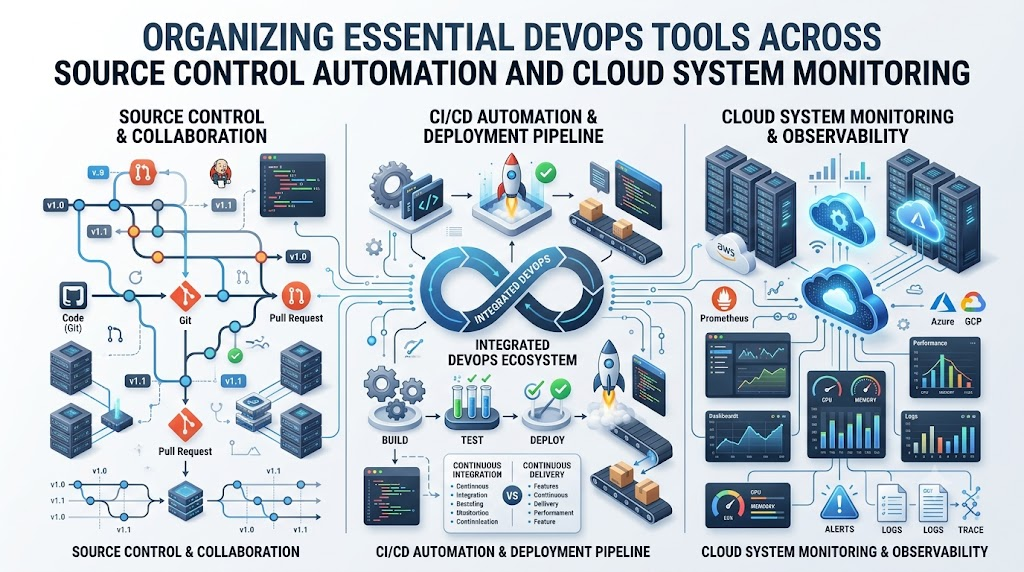
| Pipeline Builders | Test, package, and push code automatically | Jenkins, GitHub Actions, GitLab CI |
| Cluster Managers | Steer and balance groups of containers | Kubernetes, Docker Swarm |
| Code-Based Hardware | Spin up servers using plain text scripts | Terraform, OpenTofu, Ansible |
| System Meters | Track processor strain and response speed | Prometheus, Grafana, Datadog |
| Event Logs | Gather server notes to trace bugs | Elasticsearch, Fluentd, Loki |
| Cloud Hosts | Rent remote computers and disk space | AWS, Microsoft Azure, Google Cloud |
| Safety Checkers | Find gaps and protect private secrets | SonarQube, Trivy, Snyk |
| GitOps Syncers | Match real cloud setups to Git repos | ArgoCD, Flux |
Version software tracks every author who edits a file line. Containers box an app so it behaves identically on any desktop. Pipeline builders test software updates automatically every time an author saves work. Cluster managers distribute web traffic across crowded server racks. Code-based setup tools build machines through short text instructions. System meters display clear graphs of memory and speed. Event logs capture bug notices when errors appear. Cloud hosts supply online servers across the globe. Safety tools scan scripts for accidental holes. GitOps syncers ensure live servers match your stored repo configs.
DevOps Tools Comparison Made Simple
Workgroups need smart methods to evaluate software products. New engineers often seek the single best app on earth. In truth, no single tool fits every company. First, define the exact problem and compare necessary features. Next, inspect the learning difficulty so your peers can pick it up fast. You should also total up monthly costs and cloud utility rates.
Security controls matter heavily because leaks ruin customer trust. Check whether the software integrates cleanly with your current stack. Browse public community channels to see if helpful people answer questions. Finally, check if the app handles huge jumps in user activity. A simple, lean tool often beats a huge, confusing suite.
DevOps Certifications Roadmap
A DevOps certification roadmap helps prove your basic grasp of cloud topics. Take official tests only after you build complete mini-projects. Begin with a simple cloud fundamentals badge to gain test confidence. Next, tackle hands-on performance tests like the Certified Kubernetes Administrator exam.
Most tests run between one hundred and four hundred dollars. Many exams test your real typing speed inside a live terminal. These awards expire after two or three years, so plan your renewals. Prepare with study books, hands-on lab sandboxes, and honest practice tests. Badges cannot replace real building experience. Treat exams as handy study targets, but let working apps show your worth.
SRE Roadmap
Site Reliability Engineering applies software logic to shield online networks from failure. Think of an SRE as an emergency doctor for web applications. These engineers care about fast response times and dependable uptime. You can jump onto an SRE roadmap once you master core DevOps skills.
First, study Linux file engines and computer network rules. Next, observe how cloud balancers spread out sudden user crowds. Set up smart alerts that wake staff only during genuine hazards. Practice emergency recovery drills to resolve production drops without fear. Write code routines to handle boring maintenance tasks. Define performance targets called service level objectives. Finally, run capacity checks to buy extra servers before holiday traffic arrives.
Platform Engineering Roadmap
Platform engineering builds easy internal self-service hubs for company software developers. Instead of filing support tickets, developers visit an internal portal to do their jobs. A platform engineering roadmap shows you how to assemble these useful self-service centers.
You need strong familiarity with Linux hosts, cloud systems, and Kubernetes. You also need skills in continuous delivery and infrastructure scripting. Next, improve developer convenience to remove daily delays. Consider a newly hired developer who needs a playground database. In past decades, they waited weeks for someone to assign an account. With an internal platform, they press one button inside an internal webpage. The system spins up their test database, login keys, and network in moments. This design lets everyone launch software without painful pauses.
Real-Life Scenarios / Experiences
Concrete industry events demonstrate why teams adopt modern operations. Three real work stories illustrate this balance:
- The Failed Midnight Release: A coder uploaded files to a live shop server by hand late at night. The site halted right away because a small library went missing. The store lost shopper sales for hours. The company replaced that routine with an automated deployment pipeline. Now, automated tests catch mistakes before anything reaches live buyers.
- The Erased Cloud Server: An engineer deleted a customer database server by clicking the wrong web button. The company needed two full days to piece together a replacement server. That shock pushed them to write server configurations as code. Now, their automated scripts can launch fresh replacement clusters in minutes.
- The Hidden Traffic Spike: A mobile game crawled to a halt every weekend during tournaments. Nobody understood which microservice clogged the queue. The team set up Prometheus and Grafana boards to graph memory use. The charts exposed an unclosed connection inside a legacy score service. The engineers fixed the bug quickly and restored smooth play.
Common Mistakes to Avoid When Choosing Delhi Events
People often waste money and weekend hours on poor tech gatherings. Avoid these frequent errors when you pick local events:
- Buying Tickets Without a Clear Purpose: Learners often reserve spots without knowing what skills they want to gain. Pick your target topic before you pay for an event pass.
- Overlooking the Daily Session Timetable: Guests show up only to find elementary speeches or irrelevant topics. Check the schedule carefully to ensure topics fit your current level.
- Ignoring Live Workshop Rooms: Sitting through slide shows teaches much less than interactive labs. Favor gatherings that supply live coding stages and practice desks.
- Hunting Exclusively for Free Goodies: Beginners squander precious hours collecting plastic pens and shirts. Spend that time talking to senior builders about real workplace problems.
- Skipping Speaker Background Checks: Certain stages highlight salespeople rather than daily practitioners. Check speaker histories to ensure they craft real software for a living.
- Remaining Isolated in Dark Corners: Sitting quietly in back seats throws away helpful connection chances. Introduce yourself to nearby attendees and trade profile links.
- Selecting Advanced Technical Keynotes: Entering complex multi-region talks leaves beginners totally baffled. Select entry-level stages that explain core basics well.
- Failing to Capture Practical Notes: Listeners routinely forget important advice by Monday morning. Note down three solid tips per talk and test them on your laptop.
How DevOpsSchool.org Fits Into Your Learning Plan
DevOpsSchool.org delivers free, open learning guides for students, career changers, and engineers. It helps you navigate technical topics without expensive paywalls. The portal features guided 90-day learning outlines across DevOps, SRE, and Platform Engineering. These steady paths keep your daily study neat, organized, and focused.
DevOpsSchool.org also hosts an expansive technology directory. Learners use this directory to research and compare modern utilities side by side. It supplies practice labs and articles to strengthen hands-on problem solving. It also shares clear certification advice and hosts an open certification registry. Beginners read the plain-English tech glossary to untangle confusing trade terms quickly. Career materials also show job candidates how to tackle technical interview panels.
DevOps Jobs and Career Growth
Modern companies seek practical engineers who keep web tools online. You can chase several promising job paths once you master these basics:
- DevOps Engineer: Connect software developers with system admins and run smooth release pipelines.
- Site Reliability Engineer (SRE): Apply software scripts to make large websites fast, steady, and resilient.
- Cloud Engineer: Construct and protect server estates inside global cloud hosting centers.
- Platform Engineer: Design self-service dashboards and toolkits for internal development squads.
- DevSecOps Engineer: Place automated vulnerability scanners directly inside deployment pipelines.
Prepare for these job openings by constructing finished demo apps from scratch. Publish your code inside public Git repositories to prove your capabilities. Practice repairing broken server environments on your home computer so you can fix outages quickly. Lastly, review standard interview questions about Linux commands, computer networking, and release pipelines.
Frequently Asked Questions
1. Which fundamental topic should a beginner pick on day one?
Start by mastering basic Linux commands inside a local terminal window. Web servers and container systems rely heavily on Linux distributions. Practice file generation, folder movement, and user access permissions on your laptop. Next, use Git to record your small coding revisions. This simple base makes advanced utilities much easier to understand.
2. Do beginners need full software coding skills to start?
You do not need to build complex consumer applications. However, you must write short scripts to automate repetitive daily chores. Python and Bash serve beginners exceptionally well in daily operations work. Writing small twenty-line scripts automates complex server tasks quickly. Scripting familiarity also helps you empathize with software developers.
3. How much study time does this journey take?
Most focused learners require three to six months of regular study. Devoting ninety minutes each evening develops solid engineering habits. Follow a structured three-month study plan rather than browsing scattered video channels. Build small software projects on weekends to secure your knowledge. Practical building experience beats passive watching every time.
4. What key features separate DevOps roles from SRE jobs?
DevOps describes a company culture focused on quick, steady software delivery. SRE functions as a formal engineering post that solves operational bugs through software code. DevOps engineers concentrate on delivery pipelines and team speed. SRE specialists protect server uptime, watch response speed, and repair live platform outages. Both tracks share many foundational tools.
5. Will employers demand official certificates before hiring?
Managers welcome certifications, yet badges remain optional for open roles. A tough exam certificate proves that you can finish difficult technical assignments. Even so, personal project repositories inside Git carry much more weight during interviews. Treat exams as handy study milestones rather than automatic job guarantees. Spend most of your time on practical labs.
6. Can students master these engineering tasks for zero dollars?
Anyone can study modern system administration using free, open-source software. Linux, Git, Docker, and Kubernetes cost nothing to run on personal computers. Large cloud hosts provide free starter accounts for twelve months. Turn off your virtual machines every night to dodge unexpected service charges. Free online guides supply all the direction you need.
7. What does a container actually do in plain words?
A container operates like a lightweight virtual crate for an application. It bundles program files with every software package needed for execution. Previously, programs ran fine on personal laptops yet failed on production machines. Containers fix that frequent headache. When an app runs inside a container, it behaves predictably everywhere.
8. Why do engineering teams set up infrastructure with code?
Code-driven hardware lets builders spin up virtual machines using text files. In past years, workers configured cloud setups by hand across complex web screens. That manual habit invited frequent mistakes and dropped connections. Text files let you launch dozens of identical machines in seconds. You also store those files inside version repos.
9. Which cloud platform works best for a first-time learner?
Pick one major cloud company and study its primary services thoroughly. Amazon Web Services, Microsoft Azure, and Google Cloud offer great learning paths. All three provide comparable solutions for virtual processors, drive storage, and private subnets. Once you understand one provider, adopting another platform requires little extra work. Stick with your chosen host first.
10. How can learners practice repairing broken computer systems?
Run a test web program inside a local virtual container. Tweak a settings file on purpose to sever the application link. Then, study the server error logs to locate the true reason for the outage. Reading raw log text teaches you how components communicate. Fixing these broken environments yields persuasive stories for your next job interview.
11. What primary job does an automated pipeline handle?
A continuous pipeline serves as an automated digital factory line for software code. When a programmer submits fresh files, the pipeline reacts instantly. It executes checks to confirm that the new code preserves existing features. When checks pass, it packages the app and pushes it to active servers. This automation removes slow, risky manual steps.
12. How do internal developer portals make work easier?
Internal platforms provide software builders with intuitive self-service controls. Developers order fresh test databases or testing spaces by pressing simple buttons. They skip waiting for manual ticket approvals from overloaded operations crews. This setup lets programmers spend their days designing helpful product features. It boosts company release speed while keeping security tight.
CONCLUSION
Stepping into cloud systems work demands patience, curiosity, and steady daily effort. Lay down a firm foundation with terminal tools, version control, and computer networks. Focus on a single skill set before you introduce another layer of complexity. Construct complete practice labs every week to test your actual capabilities. Ignore temporary internet trends and prioritize reliable system principles. Use industry certifications to guide your study, but let working software demonstrate your genuine talent. Explore reliability engineering and self-service platform design as you grow. Every small terminal command you test brings you closer to a successful tech career.
